
The GWSMARTBT is built for the pros, with full-system diagnostics, 23 reset/relearn functions, live data mapping, and more. Download the GWSMARTBT app from the App Store or Google Play and diagnose any vehicle problem from the palm of your hand.
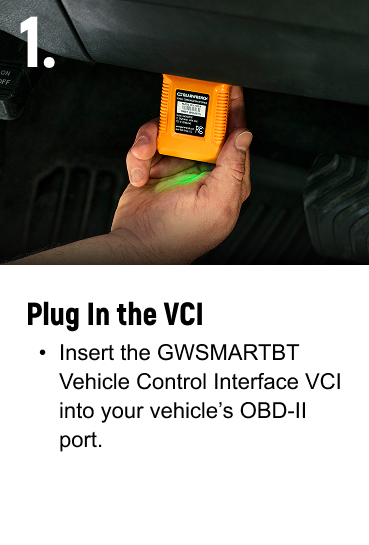
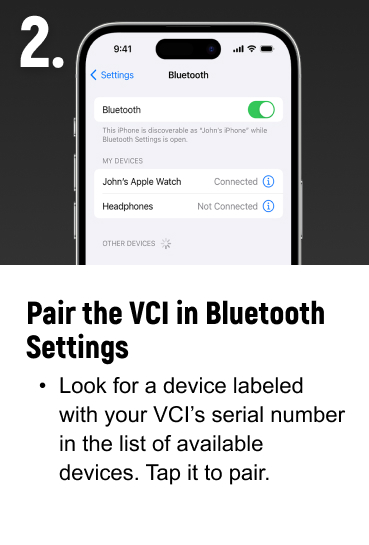
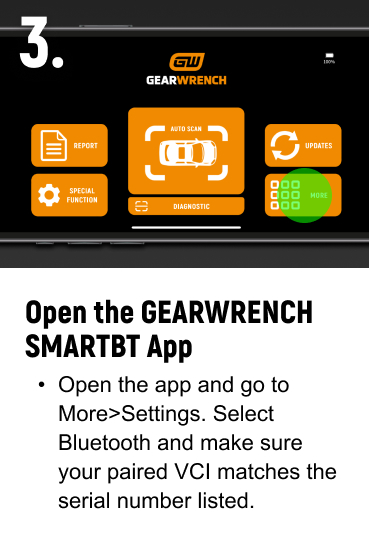
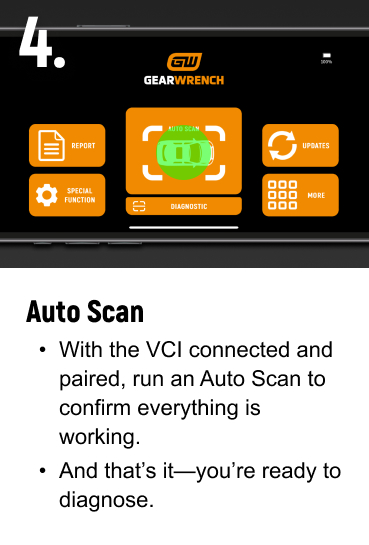

Vehicle Coverage Guide
Use our Vehicle Coverage Guide to quickly check compatibility across makes, models, and systems. Whether you're a professional technician or a DIYer, this tool helps you make confident, informed decisions before you scan.

SPECIFICATIONS
- Reads/Clears Codes: Yes
- AutoAuth Ready: Yes
- Rechargeable: No
- Upgradeable: Yes
- Vehicle Compatibility: 185+ Brands
- Software Updates: Free Lifetime
- Memory: 4MB+360 KB
- Type: Diagnostics, Diagnostic Scanner
- Warranty: 2 Years
- Reads ABS Codes: Yes
- Connectivity Method: Bluetooth
- Overall Height: 0.9 inches
- Overall Width: 2.1 inches
Search "GWSMARTBT" on the Apple Store or Google Play Store to download the app.
GWSMARTBT supports most vehicles which is compatible with OBDII. You can check out our Vehicle Coverage Guide. Or if you are unsure of the protocol for your car, please contact diagnosticsupport@gearwrench.com for additional guidance.
REGISTERING YOUR DEVICE
Use our AUTOAUTH registration guide to quickly authorize your GWSMARTBT diagnostic scanner for enhanced features, including FCA Secure Gateway access. Get step-by-step setup support and start scanning smarter today.

MANUALS & GUIDES
Access videos, manuals, and setup guides to get the most from your GWSMARTBT Bluetooth diagnostic scanner. Explore key features, find support materials, and unlock the full potential of your GEARWRENCH diagnostic tool.
